
Introduction
Building software today is fast. Teams push new updates, features, and fixes multiple times a day. But in the rush to deliver fast, security often gets left behind. Historically, security teams would review an application right before its public release. If they found a major flaw, the launch had to wait weeks while developers scrambled to fix it. This creates frustration, slows down business, and leaves systems vulnerable to attack.
A DevSecOps roadmap solves this problem by sharing the responsibility of security across the entire team. This guide explains what a DevSecOps roadmap is, why it matters, and how developers and security professionals can follow it to build safer software without slowing down delivery.
What Is DevSecOps?
DevSecOps stands for Development, Security, and Operations.
Put simply, DevSecOps means making security a part of every step in building and running software.
Traditional security usually worked like a security guard standing at the exit door, checking bags right as people tried to leave. If someone had something dangerous, they had to go all the way back inside. DevSecOps is like having a security checkpoint at every single doorway inside the building. Everyone helps keep the space secure as they move forward.
Why does this matter? When security is built into the daily workflow, vulnerabilities are caught when the code is first written. Fixing a security bug while writing code takes minutes. Fixing that same bug after the software is released to millions of users can take weeks and cost a fortune.
How a DevSecOps Roadmap Works
A DevSecOps roadmap outlines the journey an organization takes to shift from traditional security to automated, team-wide security. It is not a single tool you install. It is a culture change supported by specific processes and automated checks.
The roadmap breaks software delivery down into distinct phases. At each phase, specific security checks take place automatically so that human developers can focus on building features while the system watches for mistakes.
Why DevSecOps Matters for Developers and Security Teams
Both developers and security teams face heavy pressure. Developers want to ship features quickly to satisfy users. Security teams want to protect the organization from data breaches and cyberattacks.
When these two teams work in isolation, friction happens. Developers view security as a roadblock. Security teams view developers as careless.
A shared DevSecOps roadmap aligns both groups around common goals:
- Shared Ownership: Security becomes everyone’s job, not just the security team’s burden.
- Speed with Safety: Automation handles repetitive security scans in the background, allowing fast deployments.
- Early Detection: Flaws are caught in development environments long before hackers can see them in production.
Core Phases of a DevSecOps Roadmap
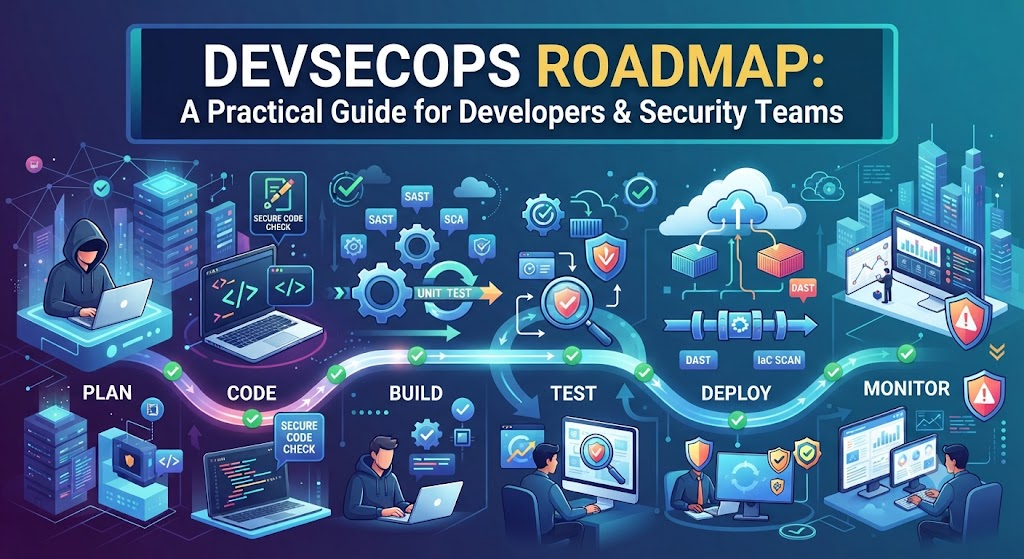
A practical DevSecOps roadmap moves through the standard software development lifecycle, adding security measures to each stage.
Phase 1: Planning and Design
Security begins before a single line of code is written. During the planning phase, teams identify what data the application will handle and what threats it might face.
- Threat Modeling: A structured exercise where teams think like hackers to figure out how someone might break the system.
- Security Requirements: Defining rules, such as how passwords must be hashed or how user data must be encrypted.
Phase 2: Coding and Development
This is where developers write the actual application logic. Security practices here focus on helping developers write safe code.
- Secure Coding Guidelines: Clear standards on what coding patterns to avoid (like SQL injection risks).
- IDE Security Plugins: Tools built right into the developer’s text editor that point out security flaws as they type.
Phase 3: Building and Testing (CI/CD Pipeline)
Once code is committed, it enters an automated pipeline where it is built and tested. This is the engine room of DevSecOps.
- SAST (Static Application Security Testing): Automated tools that scan raw source code for known security flaws.
- SCA (Software Composition Analysis): Tools that check open-source libraries and third-party packages for known vulnerabilities.
- Unit and Integration Testing: Automated tests that verify the application behaves correctly under normal and abnormal conditions.
Phase 4: Release and Deployment
When the code passes all automated tests, it is packaged and deployed to production environments.
- DAST (Dynamic Application Security Testing): Automated tools that attack the running application from the outside to find active weaknesses.
- Infrastructure as Code (IaC) Scanning: Checking cloud configuration scripts to ensure servers are not accidentally left open to the public internet.
Phase 5: Monitoring and Operations
Even after software is live, security continues.
- Log Monitoring: Collecting system logs to watch for strange behavior, such as thousands of failed login attempts from a single IP address.
- Incident Response: A planned playbook for what the team will do if a security breach or system failure occurs.
Practical Example: Securing a Login Page
Imagine a small team building a new customer login portal.
- Old Way: The developers write the login code quickly. They finish the project and hand it to the security team. The security team finds that passwords are being stored insecurely in the database. The project is delayed by two weeks while developers rewrite the database logic.
- DevSecOps Way: The developers use an IDE plugin that warns them immediately if they try to save plaintext passwords. Later, when they push the code to the repository, an automated SCA tool checks the login libraries for outdated versions. The issue is caught and fixed in five minutes on a Tuesday morning, long before any security review meeting.
Real-World Considerations and Challenges
Moving to DevSecOps is a cultural journey as much as a technical one. Organizations often face common hurdles during implementation.
- Tool Fatigue: Teams sometimes buy dozens of security tools and turn them all on at once. This generates thousands of false alarms, overwhelming developers. The solution is to start with one or two essential scanners and tune them carefully before adding more.
- Developer Pushback: If security tools block deployments constantly with inaccurate warnings, developers will try to bypass them. Security teams must work closely with developers to ensure checks are fast and accurate.
- Skills Gap: Understanding both modern cloud operations and cybersecurity requires continuous learning. Organizations must invest in training their staff.
Common Mistakes to Avoid
- Mistake: Buying expensive tools and expecting them to fix culture automatically.
- Why it fails: Tools only report problems; people have to fix them and change how they build software.
- What to do instead: Focus on training the team and improving collaboration before investing in heavy automation software.
- Mistake: Turning on every security check at once on day one.
- Why it fails: It floods the team with thousands of alerts, causing alert fatigue and paralysis.
- What to do instead: Roll out security checks gradually, starting with high-risk vulnerabilities like open-source library flaws.
- Mistake: Treating security as a once-a-year audit.
- Why it fails: Software changes daily; an annual check leaves the system unprotected for the other 364 days.
- What to do instead: Integrate automated checks into every code commit.
Risks and Limitations
While DevSecOps drastically improves security posture, it is not a magic shield.
- Automated Blind Spots: Automated tools cannot catch every logic flaw or clever business-logic exploit. Human security testing and code reviews are still necessary.
- Pipeline Slowdowns: If security scans take hours to run, they defeat the purpose of fast delivery. Teams must optimize their test suites to run quickly.
Essential DevSecOps Tools and Methods
A successful roadmap relies on the right categories of tools integrated into the workflow:
- SAST (Static Testing): Scans code before it runs. Example use case: Catching hardcoded passwords in source code files.
- SCA (Composition Analysis): Scans third-party libraries. Example use case: Alerting the team when an open-source package has a newly discovered vulnerability.
- DAST (Dynamic Testing): Scans the running app. Example use case: Finding cross-site scripting (XSS) vulnerabilities on a live web form.
- Secret Management Tools: Protects API keys and passwords. Example use case: Keeping database connection strings out of public code repositories.
Decision Framework for Implementation
Follow these steps to build your organization’s DevSecOps roadmap:
- Assess Your Current State: Look at how code is currently written, tested, and deployed. Where are the biggest bottlenecks?
- Define Priorities: Identify the highest risks your applications face (e.g., outdated libraries, exposed cloud buckets).
- Start Small: Introduce one automated check into your existing pipeline (such as scanning open-source libraries).
- Measure and Refine: Track how long it takes to fix vulnerabilities found by the tool. Adjust settings to reduce false alarms.
- Scale Up: Once the team is comfortable, add more advanced checks like SAST and DAST.
Practical Checklist for Teams
- Inventory all code repositories and third-party dependencies.
- Implement automated dependency scanning in the CI/CD pipeline.
- Establish clear guidelines for handling discovered security vulnerabilities.
- Remove all hardcoded secrets and passwords from source code.
- Conduct basic threat modeling for new features before coding begins.
- Train developers on common secure coding principles.
Key Terms
- CI/CD Pipeline: An automated system that builds, tests, and deploys code changes.
- Vulnerability: A weakness in software that an attacker could exploit.
- False Positive: An alert from a security tool that looks like a bug or threat, but turns out to be harmless.
- Secure Coding: Writing software in a way that guards against accidental security flaws.
- Shift-Left: The practice of moving testing and security tasks earlier in the development timeline.
Frequently Asked Questions
Does DevSecOps slow down software development?
Initially, adding new checks can cause slight friction. However, once automated tools are properly tuned, DevSecOps actually speeds up development by catching bugs early, preventing emergency fixes and costly post-release security patches.
Do developers need to become cybersecurity experts?
No. Developers do not need to become penetration testers. The goal is for developers to understand basic secure coding practices and know how to respond to automated security alerts within their daily workflow.
Where should a team start on a DevSecOps roadmap?
Start with Software Composition Analysis (SCA) to check open-source dependencies. Most applications rely heavily on external libraries, and checking them provides quick visibility into major risks with minimal setup.
Is DevSecOps only for large enterprises?
No. Teams of any size benefit from automated security checks. Small teams especially benefit because automation handles security monitoring without requiring a dedicated full-time security staff.
How do we handle false positives from security tools?
Security and development teams should review alerts together to filter out noise. Tuning the rules inside the scanner helps ensure that developers only see actionable, high-priority issues.
Conclusion
A DevSecOps roadmap is a practical guide for building safety directly into the heartbeat of software development. By blending developer speed with automated security checks, teams can catch vulnerabilities early, reduce operational stress, and deliver reliable applications that users and businesses can trust. Success comes down to gradual implementation, shared responsibility, and treating security as a continuous habit rather than a final hurdle.

