
Introduction
In the past, software development teams worked in separate silos. Developers wrote code quickly, testers checked if it worked, and a separate security team scanned the final product right before release.
This final security check often created a frustrating bottleneck. Security teams would find major flaws too late, forcing developers to rewrite large parts of their code under tight deadlines.
Modern software development moves too fast for this old approach. Companies push updates daily or even hourly. Waiting until the end to check security is like building a house and checking for locks only after the front door is installed.
DevSecOps solves this problem by spreading security responsibilities across the entire development lifecycle. It keeps applications secure while helping engineering teams move fast.
What Is DevSecOps?
DevSecOps stands for Development, Security, and Operations. It is an evolution of DevOps, which is the practice of combining software building (Dev) and IT management (Ops) into one smooth workflow. DevSecOps adds security (Sec) directly into that combination.
Put simply, DevSecOps means “Security as Code.”
Why It Matters
Traditional security processes relied heavily on manual reviews and late-stage testing. In contrast, DevSecOps automates security checks so they happen automatically every time a developer saves new code. This catches vulnerabilities early when they are cheap and easy to fix.
How DevSecOps Works
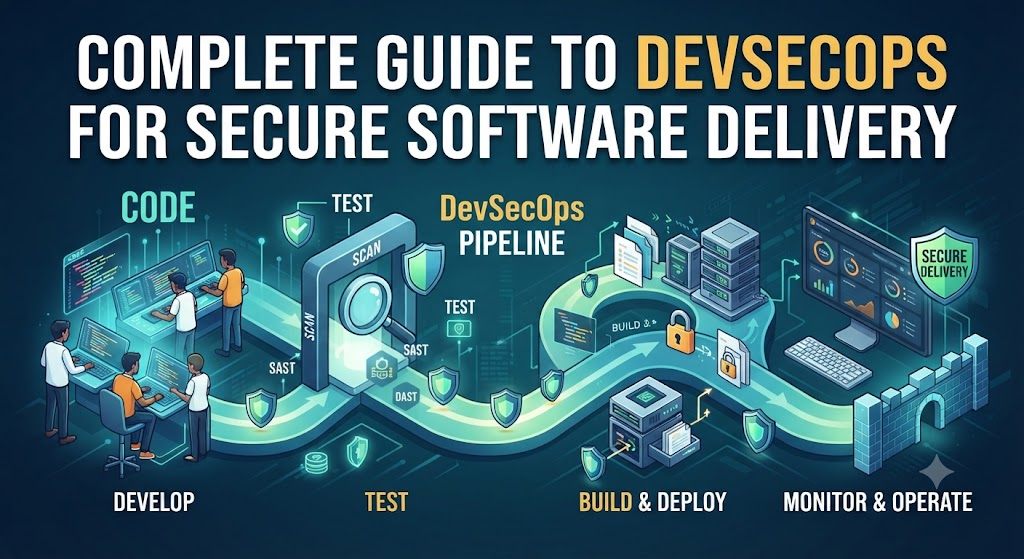
The DevSecOps workflow follows the software delivery pipeline, often called the CI/CD pipeline (Continuous Integration and Continuous Deployment). Here is how security fits into each stage:
- Plan and Design: Security teams help design threat models before writing any code. They identify what data needs protection and where attackers might try to break in.
- Code and Commit: As developers write code, automated tools scan it for accidental secrets, like hardcoded passwords or API keys.
- Build and Test: When code is compiled, automated security scanners check open-source libraries for known vulnerabilities.
- Deploy: Before software reaches live production servers, automated systems verify that infrastructure configurations follow security best practices.
- Monitor: Once the software runs live, monitoring tools watch for unusual traffic, performance drops, or active cyber attacks.
Core Components of a Secure Pipeline
A successful DevSecOps strategy relies on specific automated tools and practices integrated into the development pipeline.
- Static Application Security Testing (SAST): Tools that read source code to find security flaws before the software runs. Think of it as a spellchecker for security vulnerabilities.
- Dynamic Application Security Testing (DAST): Tools that test a running application from the outside, simulating how a hacker would try to break in.
- Software Composition Analysis (SCA): Scanners that check third-party libraries and open-source packages for known security bugs.
- Container Security: Tools that verify container images (like Docker) do not contain outdated software or unpatched system flaws.
Practical Example
Imagine a small e-commerce startup building a new online checkout page.
- The Old Way: The developers build the entire checkout flow over three months. Two days before launch, the security team reviews the code and discovers that credit card numbers are saved insecurely in plain text. The launch is delayed by two weeks while the team rewrites the database storage code.
- The DevSecOps Way: As soon as a developer writes the database connection code, an automated tool flags the insecure data storage. The developer fixes it in five minutes before moving on to the next feature. The project launches on time, and the code remains secure.
Real-World Considerations
Implementing DevSecOps requires more than just installing new security software. Organizations must address cultural and operational realities.
- Cultural Shift: Security cannot be owned by a single isolated team anymore. Developers must learn basic security awareness, and security professionals must learn how development pipelines operate.
- Tool Fatigue: Introducing too many security scanners can overwhelm developers with false alarms. Teams must tune tools carefully to highlight only real, actionable risks.
- Speed vs. Safety: The goal is not to block every deployment with manual approvals, but to automate safe guardrails that run quietly in the background.
Common Mistakes
1. Buying Tools Before Changing Culture
- What people do: Purchase expensive security software and expect it to fix security overnight.
- Why it causes problems: If developers do not understand how to use the tools or view security as an enemy, software will remain insecure.
- What to do instead: Invest in developer training and collaboration before selecting automation tools.
2. Treating Security Scans as a Once-a-Month Event
- What people do: Run automated scans only right before major releases.
- Why it causes problems: Fixing hundreds of accumulated bugs at once creates massive delays.
- What to do instead: Run lightweight security checks on every single code commit.
3. Ignoring False Positives
- What people do: Let security tools flood developers with hundreds of unverified warnings.
- Why it causes problems: Developers start ignoring the security alerts completely.
- What to do instead: Fine-tune scanner configurations to reduce noise and highlight genuine risks.
Risks and Limitations
- Alert Fatigue: Too many automated warnings can cause teams to miss critical vulnerabilities.
- Implementation Complexity: Integrating security checks into legacy software systems can be difficult and time-consuming.
- Initial Productivity Dip: Training teams on new security workflows can temporarily slow down feature delivery until best practices become second nature.
Decision-Making Framework
Use these steps to introduce DevSecOps practices effectively:
- Step 1: Audit your current development pipeline to see where code moves from creation to production.
- Step 2: Identify the highest-risk areas, such as third-party open-source libraries or cloud storage configurations.
- Step 3: Introduce one automated security scanner at a time (such as an open-source dependency checker) rather than changing everything at once.
- Step 4: Train developers on how to read and resolve the warnings generated by the scanner.
- Step 5: Gradually add more advanced testing tools as the team gains confidence.
Checklist for DevSecOps Adoption
- [ ] Automated secret-scanning enabled to catch exposed passwords in code repositories.
- [ ] Open-source dependency analysis integrated into the build process.
- [ ] Code review guidelines updated to include security checks.
- [ ] Infrastructure configuration checked automatically before deployment.
- [ ] Logging and monitoring set up to detect unusual runtime behavior.
Key Terms
- CI/CD Pipeline: The automated process that builds, tests, and deploys software updates.
- Vulnerability: A weakness in software code that an attacker could exploit.
- SAST: Automated testing that analyzes source code for security flaws without running the program.
- DAST: Automated testing that attacks a running application to find security gaps.
- SCA: Automated analysis of third-party open-source components for known bugs.
- Threat Modeling: The process of identifying potential security threats during the design phase.
- False Positive: An incorrect warning from a security tool reporting a vulnerability that does not actually exist.
- Hardcoded Credentials: Passwords or API keys written directly into source code instead of secure storage.
FAQs
Why is traditional security no longer enough?
Traditional security tested software only at the end of development. Modern software updates happen too frequently for manual, end-of-cycle reviews to keep pace without causing major delays.
Does DevSecOps slow down software delivery?
Initially, setting up automated security tools takes time. However, once established, DevSecOps speeds up delivery by catching and fixing bugs early, preventing costly delays right before launch.
Do developers need to become security experts?
No. Developers do not need to become security specialists, but they should understand basic secure coding principles and know how to respond to automated security alerts in their code.
What is the difference between DevOps and DevSecOps?
DevOps focuses on collaboration between development and operations to deliver software quickly. DevSecOps integrates security practices into every phase of that exact same workflow.
How do we start implementing DevSecOps on a tight budget?
Start with free or open-source tools for dependency scanning and secret detection. Integrate them into your existing code repository workflows before purchasing expensive enterprise platforms.
Conclusion
Securing modern software requires shifting security to the earliest possible stages of development. By combining automated tools with clear workflows and developer education, organizations can deliver feature updates quickly without compromising safety. Start small, automate repetitive security checks, and build a culture where secure coding is a shared responsibility.

