
Introduction
In the past, building software was like an assembly line where departments worked in isolated silos. Developers wrote the code, operations teams deployed it to servers, and a separate security team checked it for flaws at the very end.
This traditional approach created major bottlenecks. Security checks often took weeks, resulting in delayed product launches, tense arguments between teams, and vulnerabilities slipping into production anyway.
To fix this, the software industry introduced DevOps. It broke down walls between developers and operations to speed things up. But as cyber threats grew more sophisticated, rushing code out the door created new risks.
That is why DevSecOps emerged. This guide explores the practical differences between DevOps and DevSecOps, why the shift matters, and how to choose the right approach for your organization.
What Is DevOps?
DevOps is a cultural and technical practice that combines Software Development (Dev) and Information Technology Operations (Ops).
Simple Meaning
Imagine a restaurant kitchen. In the past, the chefs (developers) cooked the food and handed it over a high wall to the waiters (operations) to serve. If a dish was wrong, the waiters blamed the chefs, and the chefs blamed the waiters. DevOps knocks down that wall. Everyone works as one team to prep, cook, and serve the food smoothly.
Why It Matters
DevOps speeds up software delivery. By automating repetitive tasks—like testing code and moving it to servers—companies can release new features in minutes instead of months. It reduces human error and ensures that the software running on live servers matches what was tested.
What Is DevSecOps?
DevSecOps stands for Development, Security, and Operations. It is the practice of integrating security tasks into every phase of the software development lifecycle.
Simple Meaning
If DevOps is about building and serving food fast, DevSecOps ensures that someone tastes the food for poison at every single step of the recipe—from chopping the vegetables to plating the meal—rather than waiting until the customer takes a bite.
Why It Matters
Modern cyberattacks target software vulnerabilities early in the supply chain. Waiting until code is finished to check for security flaws is too late and too expensive to fix. DevSecOps shifts security left, meaning checks happen continuously and automatically as developers write code.
How DevOps and DevSecOps Work
To understand how these two methodologies operate in practice, it helps to look at their workflows.
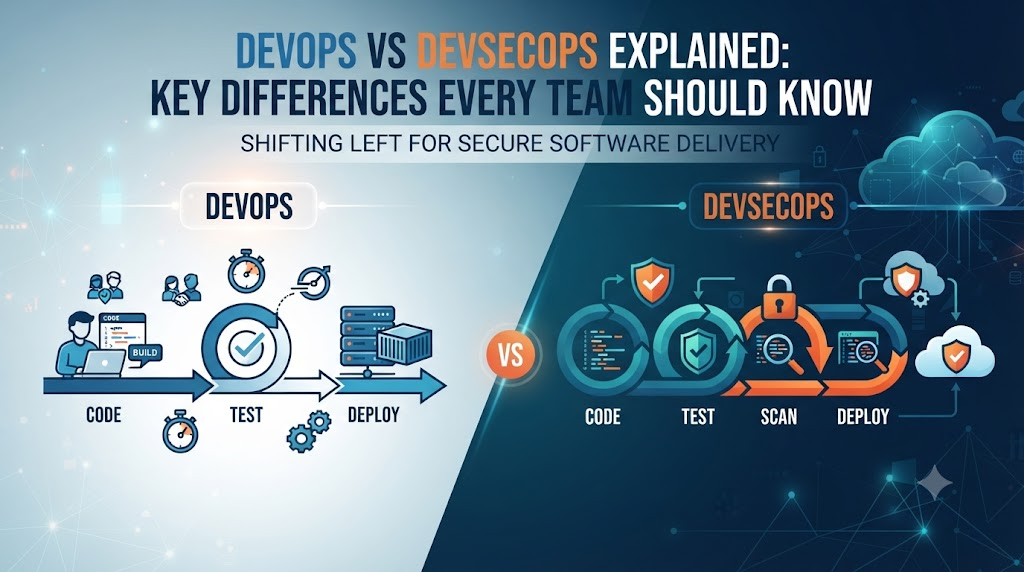
The DevOps Pipeline (CI/CD)
A standard DevOps pipeline relies on Continuous Integration and Continuous Deployment (CI/CD):
- Plan: Teams outline new features.
- Code: Developers write the code.
- Build: Automated tools compile the code into a package.
- Test: Automated scripts check if the code breaks existing features.
- Deploy: The code is automatically pushed to production servers.
The DevSecOps Pipeline
The DevSecOps pipeline injects security gates into every step above without slowing down the assembly line:
- Secure Coding: Integrated development environment (IDE) plugins scan code for insecure patterns as the developer types.
- Automated Scanning (SAST/DAST): Static and dynamic security tools scan the build for known vulnerabilities.
- Dependency Checks: Automated tools check third-party libraries for outdated or compromised components.
- Continuous Monitoring: Once deployed, systems are continuously watched for suspicious activity or configuration drift.
Core Differences Between DevOps and DevSecOps
| Feature | DevOps | DevSecOps |
| Primary Focus | Speed, collaboration, and automation between dev and ops. | Security integrated into every phase of development and operations. |
| Security Timing | Security is often reviewed near the end or post-deployment. | Security is continuous (“Shift Left” from day one). |
| Team Responsibility | Developers and operations own speed and stability. | Everyone (dev, ops, security) shares responsibility for security. |
| Tooling | CI/CD pipelines, containerization, monitoring tools. | CI/CD plus automated security scanners, secret management, and compliance checks. |
| Speed vs. Safety | Prioritizes rapid delivery and operational efficiency. | Balances rapid delivery with proactive risk management. |
Why DevOps Sometimes Falls Short on Security
DevOps revolutionized software delivery, but it has a blind spot. Because the primary cultural driver of DevOps is speed, teams can easily prioritize shipping features over locking down security controls.
Common issues in a pure DevOps environment include:
- Hardcoded Credentials: Developers might accidentally leave database passwords or API keys inside configuration files.
- Outdated Dependencies: Relying on open-source code libraries that contain unpatched security vulnerabilities.
- Misconfigured Cloud Infrastructure: Leaving storage buckets or servers publicly accessible because permissions were set incorrectly for convenience.
Real-World Practical Considerations
Transitioning from traditional development to DevOps, and eventually to DevSecOps, requires careful planning.
Cultural Resistance
The biggest hurdle is not technical; it is cultural. Security teams are traditionally viewed as roadblocks who say “no” to new ideas. DevSecOps requires security professionals to act as coaches, teaching developers how to write secure code from the start.
Tool Fatigue
Teams often make the mistake of buying every automated security scanner on the market. Too many tools generate a flood of false alarms, overwhelming developers and slowing down deployment. The key is starting with a few essential tools and tuning them properly.
Common Mistakes
- Treating DevSecOps as a Software Tool: Buying a security scanner does not mean you have adopted DevSecOps. It is primarily a cultural shift toward shared responsibility.
- Shifting Everything Left Without Training: Telling developers to fix security bugs without teaching them how creates frustration and delays.
- Ignoring False Positives: Allowing automated tools to block deployments over minor or incorrect warnings destroys developer trust in the security process.
Risks and Limitations
- Initial Slowdown: Introducing security checks into an existing pipeline can temporarily slow down release cycles while teams adapt.
- Alert Fatigue: High volumes of security alerts can lead teams to ignore critical warnings.
- Complexity: Managing automated compliance and security policies across multi-cloud environments requires specialized skills.
Decision-Making Framework
How do you know whether your organization needs DevOps or DevSecOps? Use this simple framework:
- Assess Regulatory Requirements: If your software handles sensitive financial, healthcare, or personal data, DevSecOps is mandatory for compliance.
- Evaluate Threat Landscape: If your application faces high exposure to the public internet, security cannot be an afterthought.
- Check Maturity: If your organization has not yet mastered basic DevOps automation, establish those pipelines first before layering on complex automated security gates.
Key Terms
- CI/CD: Continuous Integration and Continuous Deployment; the automated pipeline used to build, test, and ship code.
- Shift Left: The practice of moving testing and security checks earlier in the software development process.
- SAST: Static Application Security Testing; scanning source code for vulnerabilities without running it.
- DAST: Dynamic Application Security Testing; scanning a running application for security flaws from the outside.
- Containerization: Packaging software code and its dependencies into a single lightweight container (like Docker) so it runs reliably anywhere.
- Secret Management: Securely storing and managing sensitive data like passwords, tokens, and keys.
FAQs
Can you do DevSecOps without DevOps?
No. DevSecOps is an evolution of DevOps. You must first establish automated collaboration and deployment pipelines before you can effectively weave security into them.
Does DevSecOps eliminate the security team?
No. Security teams shift from being gatekeepers who review code at the end of a project to enablers who build guardrails, set policies, and guide developers.
Is DevSecOps only for large enterprises?
Not at all. Startups and small teams benefit greatly from DevSecOps because catching a security vulnerability early is significantly cheaper than fixing a data breach after launch.
What does “Shift Left” mean?
It means moving tasks like security testing and quality checks to the left (earlier) in the development timeline, rather than waiting until the right side (the end) of the project.
Conclusion
DevOps changed how the world builds software by breaking down barriers between developers and operations to maximize speed and efficiency. However, speed without security invites disaster.
DevSecOps bridges that gap by making security an active, automated part of the entire development lifecycle. By treating security as a shared responsibility rather than a final hurdle, organizations can build software that is both fast and resilient.

