
Introduction
Many IT professionals work for years managing servers, writing code, or configuring virtual networks. At some point, many want to step up to high-level system design. They want to decide how an entire business runs in the cloud, rather than just fixing individual machines or deploying single apps. This transition leads to the role of an Azure Solutions Architect.
Stepping into this position is often confusing. Job descriptions ask for deep knowledge in networking, code development, data engineering, disaster recovery, and cybersecurity all at once. Newcomers often believe an architect must memorize every single service in the Microsoft catalog. Others assume passing a single multiple-choice test will immediately secure a senior architect role.
Neither assumption is true. Becoming an Azure Solutions Architect is not about knowing every toggle in the Azure portal. It is about understanding how different technical components fit together to solve a business problem safely, reliably, and within budget.
This guide breaks down the complete Azure solutions architect career path. It covers the essential skills, the right certification sequence, real-world design trade-offs, and how to build practical architectural judgment from the ground up.
What Does an Azure Solutions Architect Actually Do?
To understand the career path, you must understand the daily job. A solutions architect translates a company’s operational and business needs into safe, scalable technical systems on Microsoft Azure.
Think of building a commercial office tower:
- Construction workers and electricians pour concrete, wire panels, and lay pipes. In cloud computing, this is the work of administrators, DevOps engineers, and software developers.
- The building architect determines where the load-bearing walls go, how fire escapes function, how much weight the foundation can carry, and how to keep construction inside the client’s budget.
In cloud computing, the Azure Solutions Architect is that building architect. They do not spend all day writing application code or manually setting up individual user accounts. Instead, they answer questions like:
- If our primary data center experiences a total power outage, will our customer app stay online?
- How can we prove that sensitive patient data stays encrypted and compliant with legal rules?
- How do we prevent our cloud computing bill from doubling next month as web traffic grows?
- What happens if our database takes on three times its normal query volume during a flash sale?
An architect looks across multiple technical domains—security, compute, networking, data storage, and governance—to produce a blueprint that engineers can build and run with confidence.
Core Pillars of the Azure Architecture Role
Every successful Azure architecture relies on five core pillars, defined formally in the Microsoft Azure Well-Architected Framework. Understanding these pillars early in your career helps you make better design decisions:
- Reliability: How well a system recovers from infrastructure failures and continues to work.
- Security: How well data, identities, and resources stay protected from threats.
- Cost Optimization: How to eliminate wasted spend and get maximum business return for every dollar spent on cloud resources.
- Operational Excellence: How efficiently the team can build, release, monitor, and patch systems in production.
- Performance Efficiency: How smoothly the system handles spikes in demand without wasting idle capacity.
Key Skills You Need Along the Path
Moving into cloud architecture requires a blend of technical depth and broad system-level thinking. Below are the key technical domains you must master.
1. Identity and Access Management
In traditional data centers, physical firewalls and office perimeter security keep outsiders away from systems. In the cloud, identity is the primary security boundary.
- Microsoft Entra ID (formerly Azure Active Directory): You must understand directory sync, enterprise applications, and multi-factor authentication (MFA).
- Role-Based Access Control (RBAC): Assigning precise permissions to users and groups so no one has more access than their job requires (the principle of least privilege).
- Managed Identities: Allowing Azure services to talk to each other securely without developers embedding secret passwords in configuration files.
2. Cloud Networking and Hybrid Connectivity
Networking mistakes cause outages, performance bottlenecks, and security holes. Architects must know how to isolate and route traffic cleanly.
- Virtual Networks (VNets) and Subnets: Dividing cloud environments into clean, isolated segments.
- Network Security Groups (NSGs): Setting up virtual firewalls to filter traffic entering and leaving your resources.
- Private Endpoints: Keeping connections to cloud databases off the public internet by giving them an internal, private IP address.
- Hybrid Connectivity: Linking on-premises office networks to Azure using Site-to-Site VPNs or dedicated private lines like Azure ExpressRoute.
3. Compute and Application Modernization
Architects must select the best platform for running workloads. This choice depends on the application’s age, design, and performance needs.
- Infrastructure as a Service (IaaS): Running traditional Azure Virtual Machines. This offers full control over the operating system, but leaves maintenance, patching, and backups in your hands.
- Platform as a Service (PaaS): Using managed platforms like Azure App Service or Azure Container Apps. Azure manages the underlying operating system and hardware, letting your team focus on application code.
- Microservices and Containers: Orchestrating applications with Azure Kubernetes Service (AKS) for complex enterprise workloads that need high scaling and fine-grained control.
4. Data Storage and Persistence
Choosing the wrong database engine or storage tier leads to high latency, poor scalability, and bloated bills.
- Blob Storage: Storing unstructured files, media, and raw backups across hot, cool, and archive storage tiers.
- Relational Databases: Managing structured data with services like Azure SQL Database, which provides automated backups and high-availability options.
- NoSQL Databases: Using services like Azure Cosmos DB for global data replication and single-digit millisecond response times.
5. Governance, Compliance, and FinOps
Cloud environments quickly become chaotic without central governance.
- Azure Policy: Enforcing rules automatically across a subscription (for example, blocking teams from spinning up expensive VM sizes or creating unencrypted disks).
- Management Groups and Subscriptions: Structuring accounts cleanly to manage billing and security boundaries across different company departments.
- FinOps (Financial Operations): Monitoring cloud spending, right-sizing resources, and purchasing Reserved Instances or Savings Plans to avoid costly budget overruns.
The Certification Roadmap: Stepping Through the Tiers
Certifications alone do not guarantee a job, but they provide a structured study syllabus and prove baseline competence to hiring managers. Microsoft uses a tiered certification model.
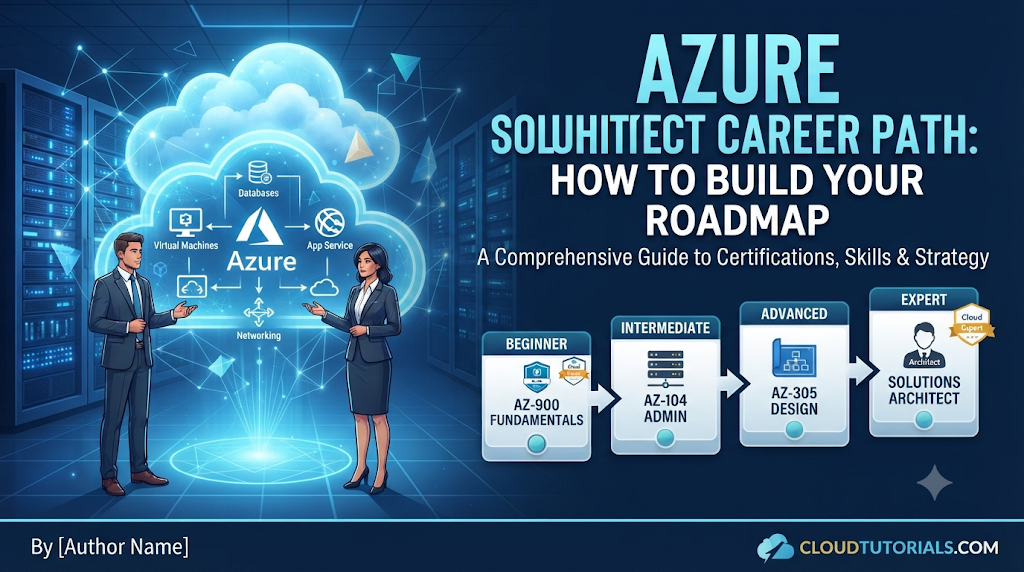
Step 1: AZ-900 (Microsoft Azure Fundamentals)
- Who it is for: Complete beginners or professionals moving from non-technical IT roles.
- What it covers: Basic cloud concepts (IaaS vs. PaaS vs. SaaS), high-level Azure services, security fundamentals, and pricing calculators.
- Is it mandatory? No. If you already have system administration, networking, or coding experience, you can skip this exam and start directly at the Associate level.
Step 2: AZ-104 (Microsoft Certified: Azure Administrator Associate)
- Who it is for: Cloud engineers, sysadmins, and aspiring architects.
- What it covers: Day-to-day administrative execution—configuring virtual networks, managing storage accounts, deploying VMs, handling user identities in Entra ID, and monitoring resource health.
- Why it matters: This exam is the required prerequisite for earning the Solutions Architect Expert credential. It ensures that before you design systems on paper, you know how to build and operate them inside the Azure management portal and CLI.
Step 3: AZ-305 (Designing Microsoft Azure Infrastructure Solutions)
- Who it is for: Senior engineers, technical leads, and systems designers.
- What it covers: High-level architectural decision-making. Questions present business constraints, budget ceilings, and uptime targets, requiring you to select the best combination of services.
- The Result: Passing both AZ-104 and AZ-305 earns you the official badge: Microsoft Certified: Azure Solutions Architect Expert.
Architectural Trade-Offs: How to Evaluate Real Design Options
Senior architects do not search for the “perfect” solution because every architectural choice involves trade-offs. Improving one area often adds cost, operational complexity, or latency to another.
The table below contrasts common architectural choices you will evaluate as an Azure architect:
| Architecture Choice | Primary Benefit | Notable Trade-Off | When to Choose |
| IaaS (Virtual Machines) | Maximum control over the OS, drivers, and custom software stacks. | High operational maintenance: you manage OS patching, security updates, and failovers. | Legacy enterprise applications that cannot be rewritten or containerized. |
| PaaS (Azure App Service) | Low maintenance: Microsoft manages OS patching, scaling routines, and hardware. | Less environmental control; application must adhere to the service’s runtime boundaries. | Modern web applications, standard APIs, and teams focused entirely on business logic. |
| Containers (AKS / Container Apps) | High portability, consistent deployments, and efficient use of compute density. | Steeper learning curve, complex cluster networking, and operational overhead. | Microservice architectures requiring fast deployment pipelines and flexible multi-cloud logic. |
| Locally-Redundant Storage (LRS) | Lowest possible storage cost. | Data is only protected against hardware failures inside a single physical data center. | Non-critical workloads, dev/test environments, or easily reproducible data assets. |
| Zone-Redundant Storage (ZRS) | High resilience; data syncs across three physically separate availability zones. | Higher cost than LRS. | Mission-critical production applications requiring protection against whole-facility outages. |
Practical Architectural Decisions: A Real-World Example
To understand how an architect reasons through a problem, consider this practical scenario.
The Business Request
A mid-sized logistics company wants to migrate an internal dispatching application to Azure.
- The application runs on a web server backed by a relational database.
- The system is used during business hours (7:00 AM to 7:00 PM).
- Unscheduled downtime during the workday costs the company approximately $5,000 per hour in idle warehouse labor.
- The IT manager wants to run two virtual machines behind a load balancer with database backups taken every night.
The Architect’s Analysis
The architect reviews the proposal against the Well-Architected Framework:
- Failure Domain Risk: If the two virtual machines sit in the same Azure Availability Zone, a single localized power or cooling issue in that data center takes the entire dispatch system down.
- Architect’s Recommendation: Deploy the compute layer across Availability Zones. This ensures that if one physical facility fails, instances in neighboring zones continue handling traffic without interruption.
- Maintenance Overhead: Running database software on a self-managed Virtual Machine means the internal IT staff must spend nights applying operating system patches, testing storage failovers, and monitoring transaction logs.
- Architect’s Recommendation: Migrate the database layer to Azure SQL Database (PaaS). This delegates routine patching, automatic daily backups, point-in-time recovery, and high availability to Microsoft.
- Cost Optimization: The dispatch application is rarely accessed outside of business hours.
- Architect’s Recommendation: If running containerized or serverless components, configure auto-scaling rules to spin down excess instances outside of core business hours, saving compute budget every evening and weekend.
By applying these principles, the architect delivers a system that is more resilient, requires less routine maintenance from the staff, and stays within budget.
Common Career Mistakes to Avoid
Many candidates face setbacks when working toward a cloud architecture role. Watching out for these common missteps will keep your progress on track:
1. Treating Certifications as a Substitute for Hands-On Practice
- The Mistake: Memorizing question dumps to pass AZ-104 and AZ-305 without opening the Azure portal or running code.
- Why it Causes Problems: Technical interviews for architect positions involve real-world troubleshooting, live design exercises, and whiteboard sessions. Memorized answers collapse quickly under follow-up questions from senior engineers.
- What to Do Instead: Build projects in a personal Azure subscription. Configure real virtual networks, break them intentionally, deploy applications, configure alerts, and inspect the logs to understand how components interact.
2. Over-Architecting for Hypothetical Scenarios
- The Mistake: Designing complex, multi-region systems with global load balancers and Kubernetes clusters for an internal app with 50 users.
- Why it Causes Problems: Complex architectures carry heavy infrastructure costs and require significant engineering effort to run and maintain.
- What to Do Instead: Design for current, realistic business requirements. Add clear paths to scale up later as traffic demands grow, rather than introducing unneeded complexity on day one.
3. Neglecting Communication and Stakeholder Alignment
- The Mistake: Focusing entirely on technology while ignoring communication skills, technical writing, and business finance.
- Why it Causes Problems: An architect must justify architectural investments to non-technical business leaders (like Chief Financial Officers and Department Heads) who care about risk, productivity, and costs, not technical jargon.
- What to Do Instead: Practice explaining technical designs using simple business terms. Learn to create clear system diagrams using tools like Draw.io or Visio, and write design proposals that link technical choices directly to business outcomes.
Failure Modes: Why Real-World Cloud Deployments Fail
Even qualified engineers can oversee cloud deployments that run into operational or financial trouble. Here are four common failure modes and how to prevent them:
- Unmonitored Cost Runaways:
- The Problem: Developers spin up high-performance VMs or premium storage tiers for temporary testing and forget to delete them. Weeks later, the company receives an unexpected bill for thousands of dollars.
- Prevention: Configure Azure Budgets with automated email alerts at 50%, 75%, and 90% of expected spend. Enforce resource tags to identify which department owns every deployed asset.
- Flat Network Architectures:
- The Problem: All resources are deployed into a single virtual network subnet with no internal boundaries. If an internet-facing web server is compromised, attackers can move laterally to access internal databases.
- Prevention: Segment workloads into dedicated subnets. Restrict communication between tiers using Network Security Groups (NSGs), and ensure backend databases only accept connections from approved application servers via private IP addresses.
- Untested Backups and Disaster Recovery:
- The Problem: Teams configure daily backups but never test their restoration procedures. During a real ransomware attack or accidental database deletion, they discover the backup data is corrupted or restoration takes three days instead of two hours.
- Prevention: Conduct regular disaster recovery drills. Document the system’s Recovery Time Objective (RTO) (how long you can afford to be down) and Recovery Point Objective (RPO) (how much data you can afford to lose), and test your recovery steps against those targets.
- Permission Sprawl:
- The Problem: To get things working quickly, engineers assign the broad “Owner” or “Contributor” role to entire teams at the subscription level.
- Prevention: Use Azure RBAC with custom roles or built-in, fine-grained roles. Implement Microsoft Entra Privileged Identity Management (PIM) so administrators only receive elevated privileges when needed, with mandatory justification and automatic expiration.
Step-by-Step Decision Framework for New Architectures
When assigned a new project, follow this structured approach to design a dependable solution:
- Define the Constraints: Identify the application uptime requirement (SLA), peak user load, recovery targets (RTO/RPO), data compliance rules (e.g., GDPR, HIPAA), and budget limits.
- Choose the Compute Model: Decide between Virtual Machines (IaaS), App Services/Containers (PaaS), or Serverless (Azure Functions) based on how much operational maintenance your team can handle.
- Establish Data and Network Boundaries: Determine where the data lives, select the appropriate database engine, isolate network subnets, and turn off public internet exposure for private resources.
- Apply Identity and Security Policies: Configure role-based access controls, ensure all data is encrypted at rest and in transit, and eliminate hardcoded passwords using Managed Identities.
- Implement Monitoring and Cost Controls: Deploy an Azure Log Analytics workspace, configure critical alerts in Azure Monitor, and apply budget limits to prevent surprise bills.
Practical Pre-Deployment Checklist
Before approving an architecture design for production, verify that every item on this checklist is accounted for:
- Identity: Have all service-to-service secrets been replaced with Managed Identities or Azure Key Vault references?
- Access Control: Are administrative privileges scoped to resource groups rather than wide subscription-level access?
- Network Exposure: Are backend databases and internal APIs shielded behind private endpoints with public internet access disabled?
- Redundancy: Are production virtual machines and services distributed across multiple Availability Zones?
- Backups: Are backup policies established, and has a test restoration been successfully executed within the last quarter?
- Tagging and Ownership: Does every resource contain tags identifying its environment (Production, Staging, Dev), owner, and cost center?
- Alerts: Are metric alerts configured for CPU spikes, storage thresholds, and application error rates (HTTP 5xx)?
- Budget Limits: Is an active Azure Budget assigned with automated alerts directed to the engineering and finance leads?
Key Terms to Know
- High Availability (HA): Designing a system to remain continuously operational without failing, typically by eliminating single points of failure across infrastructure.
- Availability Zone (AZ): Physically separate data centers within the same Azure region, each equipped with independent power, cooling, and network connections.
- Disaster Recovery (DR): The set of policies, tools, and procedures used to restore critical technology systems and operations after an outage or catastrophe.
- Role-Based Access Control (RBAC): A method of regulating access to computer or network resources based on the specific roles assigned to individual users.
- Infrastructure as Code (IaC): Managing and provisioning infrastructure through machine-readable definition files (such as Bicep, ARM templates, or Terraform) rather than manual portal configurations.
- Azure Bicep: A domain-specific language developed by Microsoft that uses declarative syntax to deploy Azure resources cleanly and reliably.
- SLA (Service Level Agreement): The formal commitment made by Microsoft detailing the expected uptime and performance metrics for an Azure service.
- Managed Identity: An automatically managed identity in Microsoft Entra ID that applications use to authenticate to resources without storing credentials in source code.
- Virtual Network Peering: Connecting two separate Azure Virtual Networks together directly through Microsoft’s private backbone network with low latency.
- ExpressRoute: A private, high-speed physical connection linking an organization’s on-premises data center directly to the Microsoft cloud, bypassing the public internet entirely.
Frequently Asked Questions
Can I become an Azure Solutions Architect with no prior IT experience?
Starting directly as an architect without any foundational IT knowledge is rare. Most professionals first spend 2 to 4 years working as system administrators, help desk technicians, software developers, or DevOps engineers. This foundational experience provides necessary context on how servers, networks, operating systems, and databases behave under real-world conditions.
Is coding required to become an Azure Solutions Architect?
You do not need to write complex application software every day, but you do need to read and understand code. Architects regularly review application components and write automation scripts using PowerShell, the Azure CLI, and Infrastructure-as-Code languages like Azure Bicep or Terraform.
How long does it take to prepare for the AZ-305 exam?
Preparation time depends heavily on your background. If you already hold the AZ-104 certification and work with Azure daily, 6 to 8 weeks of focused study is typical. If you are relatively new to the platform, plan for 3 to 6 months of hands-on practice, starting with the AZ-104 administration materials before moving to architectural design.
What is the difference between an Azure Administrator and an Azure Architect?
An administrator focuses on implementation, maintenance, and day-to-day operations—such as creating accounts, deploying virtual machines, configuring backup jobs, and fixing broken services. An architect focuses on high-level system strategy and design—choosing which services to use, setting architectural standards, ensuring security compliance, and planning long-term costs.
Which Infrastructure as Code (IaC) tool should an Azure Architect learn?
Begin by learning Azure Bicep, Microsoft’s native declarative language. It offers zero-day support for all new Azure services and is simpler to write than standard JSON templates. Once comfortable with Bicep, learn Terraform, as many enterprises use it to manage multi-cloud environments with shared skillsets.
How does an architect balance performance with operational cost?
Architects balance these needs by right-sizing resources based on actual metrics rather than guesswork. Instead of running oversized virtual machines continuously, an architect configures auto-scaling rules that scale resources out during peak hours and in during quiet periods. They also take advantage of pricing models like Azure Reservations or Spot Instances for flexible, non-critical batch processing.
Do I need to learn other clouds like AWS to succeed as an Azure Architect?
Specializing deeply in Azure is more than enough to build a strong career. While large enterprises occasionally deploy multi-cloud systems, each cloud platform has unique networking rules, security models, and management tools. Mastering one platform thoroughly gives you architectural principles that make learning a second platform much easier later.
How do I stay updated as Microsoft adds new features to Azure?
Follow official channels such as the Azure Updates portal, the Microsoft Learn blog, and documentation release notes. Dedicate an hour each week to review service deprecations, preview features, and updated best practices in the Azure Architecture Center.
Conclusion
Becoming an Azure Solutions Architect is a shift from executing technical tasks to making balanced business and architectural decisions. While hands-on technical fluency in networking, security, compute, and data forms the bedrock of the role, the actual value of an architect lies in knowing how to evaluate trade-offs. No design is universally perfect; every architectural choice balances cost against resilience, security against operational ease, and immediate speed against long-term maintenance.
For anyone pursuing this path, credentials like the AZ-104 and AZ-305 provide structured checkpoints, but real architectural competence comes from hands-on experimentation, learning from real-world failures, and communicating complex technical ideas in plain business terms. By focusing on steady, hands-on implementation and applying the principles of the Azure Well-Architected Framework, you can systematically build the technical depth, financial discipline, and leadership needed to design reliable cloud systems at scale.

