
Introduction
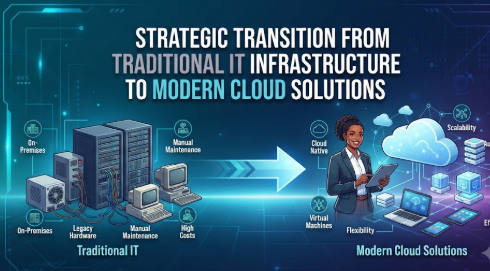
In today’s fast-paced digital landscape, many small business owners feel overwhelmed by the complexity of managing their own servers and software. You might be accustomed to the “traditional IT” model—buying hardware, installing software on-site, and hiring teams to fix it when it inevitably breaks. However, this outdated approach often leads to high costs, constant technical headaches, and missed opportunities for growth. Transitioning to the cloud can feel intimidating for beginners, but failing to understand the shift can leave your business stuck with inefficient, expensive systems. This blog will explain the fundamental reasons why businesses are moving from traditional IT to cloud platforms, helping you make informed, practical decisions. Whether you are a small business owner looking to scale or a professional seeking to improve operational efficiency, understanding this transition is key to staying competitive without falling into common traps.
Understanding Cloud Computing in Simple Words
Cloud computing is essentially renting computing power and storage over the internet instead of owning the physical hardware. In traditional IT, you buy a server, put it in a closet, and manage it. In the cloud, a provider (like AWS, Azure, or Google Cloud) keeps the hardware in massive, secure facilities, and you access your files, databases, or applications via a web browser or secure connection.
People search for this because they want flexibility. If your business grows, you don’t need to buy new servers; you just click a button to increase your cloud capacity. It is used everywhere today, from small accounting software to massive e-commerce platforms. A common misunderstanding is that “the cloud” is less secure; in reality, major cloud providers spend billions on security protocols that most individual businesses cannot afford to replicate on their own.
Why Moving to the Cloud is Important
The shift to cloud infrastructure is rarely about following a trend; it is about financial and operational survival. When you rely on traditional IT, you pay “CapEx” (Capital Expenditure)—large, upfront costs for hardware that loses value over time. Cloud computing shifts this to “OpEx” (Operating Expenditure), where you pay only for what you use. This improves cash flow, allows for faster deployment of new tools, and ensures your data is backed up across multiple locations, reducing the risk of permanent data loss.
The Real Problem Readers Face With IT Migration
The core problem isn’t just technology; it is the “Legacy Mindset.” Many owners try to force their old processes into a new environment without changing how they operate. They often face issues like hidden migration costs, insufficient staff training, or choosing the wrong cloud model, which leads to bloated monthly bills. Without a clear plan, the excitement of moving to the cloud can quickly turn into a financial and operational drain.
How Businesses Transition to the Cloud: Step-by-Step
- Assessment: Audit your current hardware and software. Identify what can move and what needs to be replaced.
- Strategy Selection: Choose between Public, Private, or Hybrid clouds based on your security needs.
- Data Cleaning: Remove redundant or outdated data before migration to save on storage costs.
- Phased Migration: Move non-critical apps first to test the process before moving core operations.
- Staff Training: Ensure your team understands how to access and manage the new environment.
- Optimization: Monitor usage to avoid unnecessary costs and ensure the system is scaling correctly.
Key Factors That Influence Cloud Adoption
- Cost Efficiency: Comparing the total cost of ownership (TCO) between hardware maintenance and cloud subscriptions.
- Scalability: The ability to handle traffic spikes during peak business hours.
- Security & Compliance: Ensuring data meets industry standards (like GDPR or local data laws).
- Reliability: Uptime guarantees provided by the cloud service provider.
- Ease of Integration: How well the cloud setup works with your existing software ecosystem.
Detailed Breakdown of the Cloud Shift
| Feature | Traditional IT | Cloud Infrastructure |
| Cost Structure | High Upfront (CapEx) | Monthly/Pay-as-you-go (OpEx) |
| Maintenance | Manual/Internal Team | Managed by Provider |
| Scalability | Slow (requires buying parts) | Instant (on-demand) |
Common Mistakes Beginners Make
- “Lift and Shift” Blindly: Moving inefficient processes to the cloud without optimizing them first.
- Ignoring Latency: Forgetting that cloud applications need a stable internet connection.
- Lack of Access Control: Not setting strict user permissions, which can lead to data leaks.
- Underestimating Training: Assuming employees will magically know how to use new interfaces.
Practical Real-Life Examples
- Retailer: A local store moves their inventory management to the cloud, allowing them to track stock in real-time from any location.
- Consultant: A small agency switches from an on-premise email server to cloud-based office suites, eliminating server maintenance costs.
- Startup: A new company uses cloud servers to launch their app, paying only for the hours they use during development.
- Accountant: A firm moves client tax data to a secure cloud platform, enabling faster collaboration and easier backup.
- Manufacturer: An SME uses cloud analytics to predict machinery maintenance, preventing costly production downtime.
Tools, Methods, and Frameworks
- Cloud Cost Calculators: Use provider-specific tools to estimate your monthly spend before migrating.
- Migration Checklists: Create a step-by-step document tracking every application moved.
- SLA Reviews: Always review the Service Level Agreement (SLA) to understand your provider’s uptime promises.
Expert Tips for Better Decisions
- Start Small: Migrate a non-essential department first to learn the ropes.
- Document Everything: Keep a record of which data is where to avoid “Shadow IT.”
- Prioritize Security: Enable multi-factor authentication (MFA) on all cloud accounts immediately.
- Review Regularly: Check your cloud bills monthly to spot unused resources that can be deleted.
Risk Awareness: What Readers Must Check First
Transitioning to the cloud introduces risks like Vendor Lock-in (difficulty moving data away from a specific provider), Data Privacy breaches due to misconfiguration, and Internet Dependency. Always verify that your chosen provider complies with local data regulations. Never store sensitive passwords in plain text within cloud documents.
Checklist Before Taking Action
- Is my internet connection stable enough for cloud services?
- Have I identified my most critical business applications?
- Do I have a data backup plan outside of the cloud provider?
- Have I calculated the total monthly cost vs. my current IT budget?
- Is my team prepared for a change in workflow?
Strategic Insights for Better Decision-Making
Most successful businesses move to a Hybrid Cloud model. This allows them to keep sensitive data on-premise (private) while using the public cloud for scalable operations. This strategy reduces risk while maximizing performance.
Key Terms Explained
- IaaS: Infrastructure as a Service; you rent the basic building blocks (servers, storage).
- SaaS: Software as a Service; you use software over the web (e.g., Gmail, Dropbox).
- Latency: The delay between an action and the response from the server.
- Uptime: The percentage of time a service is operational and accessible.
Who Should Read This Blog
- Small business owners managing legacy hardware.
- IT managers planning a digital transformation.
- Startups looking to optimize operational costs.
- Finance professionals reviewing IT budget allocations.
Frequently Asked Questions
- What is the main reason businesses move to the cloud?
Businesses move to the cloud primarily to achieve better scalability and reduce long-term infrastructure maintenance costs. - Is moving to the cloud cheaper for everyone?
Not always; for very stable, predictable workloads, on-premise might be cheaper, but the cloud offers unmatched agility. - How do I ensure my data is safe?
Use strong encryption, enable MFA, and choose reputable cloud providers that offer detailed security audit logs. - Can I move back to traditional IT if I change my mind?
Yes, but it is technically difficult and expensive, which is why planning is crucial. - What if my internet goes down?
If your business depends entirely on the cloud, ensure you have a backup internet connection (redundancy). - Does moving to the cloud require a specialized team?
It often requires retraining your existing team or hiring cloud consultants for the initial migration phase. - What is a hybrid cloud?
It is a mix of private, on-premise infrastructure and public cloud services, offering the best of both worlds. - How long does a typical migration take?
It depends on the complexity of your business, ranging from weeks for simple setups to months for legacy systems. - Are cloud services taxable differently?
Generally, cloud subscriptions are treated as operating expenses, which may have different tax implications than buying hardware. - What is the most common mistake in cloud adoption?
Underestimating the time and training required for staff to transition to new cloud-based workflows. - Do I need to hire a consultant?
For small businesses with basic needs, it is not mandatory, but for complex legacy setups, professional help prevents costly errors. - What should be my first step?
Your first step should be an audit of your current hardware and identifying which processes would benefit most from increased mobility.
Conclusion
The shift from traditional IT to cloud infrastructure is a significant step toward modernizing your business. While the transition requires careful planning, risk assessment, and a willingness to adapt your internal processes, the long-term benefits of scalability, improved security, and cost-efficiency are undeniable. By starting small, auditing your needs, and prioritizing security from day one, you can navigate this transformation successfully. Remember that cloud adoption is not a “set it and forget it” task; it requires ongoing monitoring and optimization to ensure your business remains agile and secure. Use the checklist provided, review your options carefully, and consult with professionals if your infrastructure is complex. Your journey to the cloud should be driven by business outcomes, not just technology hype.

